
Join hundreds of thousands
Access Power Menu Without Pressing Buttons
Open shutdown, restart, and power options from your screen. Perfect when your physical power button feels stiff, worn out, or hard to reach.
One Simple Tool, Multiple Benefits
On-Screen Power Control
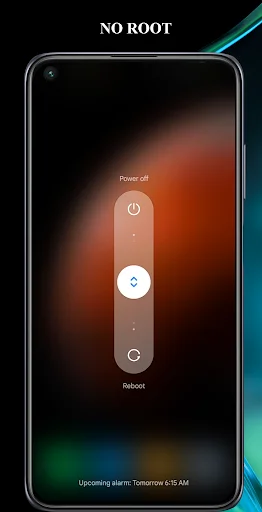
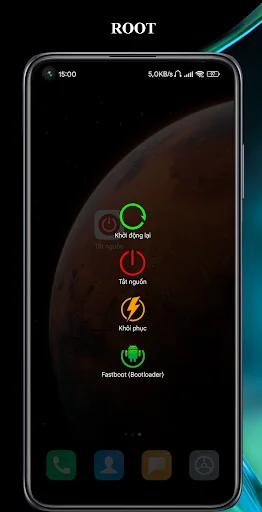
Tap a simple on-screen button to open your phone's power menu instantly. No more fumbling for the side button – access shutdown and restart options right from your screen whenever you need them.
Protect Your Hardware Button
Reduce daily wear on your physical power button and help it last longer. By using the on-screen shortcut for everyday power menu access, you can preserve your hardware button and avoid future repair costs.
Clean, Simple Interface
Get what you need without confusing menus or complicated setup. Just open the app, tap the shortcut, and access your power options in seconds – no extra steps or unnecessary features to slow you down.
Perfect For Accessibility Needs
Ideal solution when your power button is hard to press due to thick cases, stiff hardware, or accessibility challenges. Enjoy convenient power menu access that works for your specific situation and device setup.
ABOUT
Turn Off Button App - Open Power Options From Your Screen!
Turn Off Button App will assist you in reaching phone power options from an easy on-screen shortcut. It is useful when your physical power key is hard to press, feels worn out, or you simply want a faster way to open shutdown, restart, and related device controls.
Phone Off On Meny gives your phone a cleaner shortcut-style experience for everyday use. Instead of pressing the side button again and again, you can open the app and access the power menu with fewer steps.
Easy Power Shortcut Features:
- Power On Off Button App - Open device power options from a simple button-style tool
- Turn Off Screen: Power Menu - Reach shutdown and restart controls more conveniently
- Turn Off Button App - Use a clean shortcut when the hardware key is not comfortable
- Phone Off On Meny - Reduce repeated side-button use during daily phone handling
- Simple Layout - Open, tap, and access the power menu without extra clutter
- Fast Access - Helpful when you need quick power options in daily situations
- Practical Tool - Useful for older phones, stiff buttons, or frequent power menu use
Use your phone power menu with fewer button presses!
Power On Off Button App is helpful when you want the familiar power options without relying on the physical key every time. It can be useful at home, work, school, or while traveling when quick access matters.
Turn Off Screen: Power Menu keeps the main purpose clear and direct. The app focuses on opening power controls from the screen, so users do not need to deal with a complicated setup or heavy menu system.
Simple Use Flow:
- Open Phone Off On Meny from your app screen
- Tap the main shortcut button
- Use Turn Off Button App to bring up phone power options
- Choose shutdown, restart, or another available device option
- Use Power On Off Button App whenever the hardware key feels inconvenient
- Return to Turn Off Screen: Power Menu for quick access next time
Helpful For Daily Phone Use:
A physical power key is used often, and over time it can become less comfortable to press. Phone Off On Meny gives you another way to reach the same type of device controls from your screen. This is useful for users with older devices, cases that make buttons harder to press, or phones where the side key is not working smoothly.
Clean, Focused, And Easy To Understand:
Turn Off Button App is designed around one practical idea: give users quicker access to phone power options. There are no confusing extra tools or unnecessary screens.
Make Power Menu Access More Convenient!
Power On Off Button App gives you a practical shortcut for everyday phone control. Whether you want fewer hardware button presses, a simpler way to open power options, or a lightweight tool for daily use, Turn Off Screen: Power Menu keeps the process clear and convenient.
AccessibilityService Disclosure:
- The app uses the AccessibilityService API to open Android's system power menu when the user taps the on-screen shortcut.
- The user must manually choose an available option, such as power off or restart.
- The app does not collect, store, or share personal information through this service.
- It does not read sensitive screen content, monitor user activity, change settings without permission, or bypass Android privacy controls.
To enable the feature, go to Settings → Accessibility → Installed Apps and activate the service.
On some devices, auto-start, background activity, or unrestricted battery access may also be required for the shortcut to remain available.
See How Simple It Really Is
Join Thousands of Happy Users
Great Great Great !!, Thanks For The Appppppppp !!
Great Great Great !!, Thanks For The Appppppppp !!
works great, and is quick to use.
works great, and is quick to use.
Simply good
Simply good
Fantastic
Fantastic
Get instant power menu access today
Join hundreds of thousands of happy users!