Join millions of users
Your Music Library, Always With You
Play your favorite songs anytime, anywhere – no internet required. Enjoy complete control over your music collection with powerful audio customization and smart organization tools.
Everything You Need for the Perfect Listening Experience
True Offline Freedom
Listen to your entire music collection without using a single byte of data. Perfect for flights, commutes, travel, or anywhere your connection is unreliable – your music is always ready to play.
Professional Audio Controls
Transform your listening experience with a powerful equalizer, bass boost, and immersive 3D sound effects. Fine-tune every track to match your preferences and get studio-quality sound from your personal library.
Effortlessly Organized Library
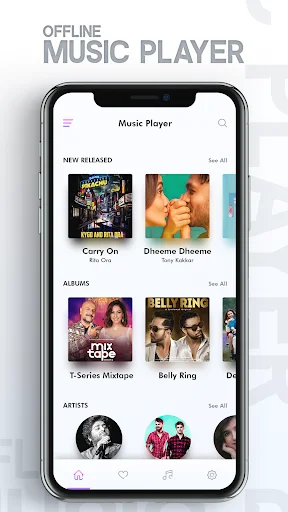
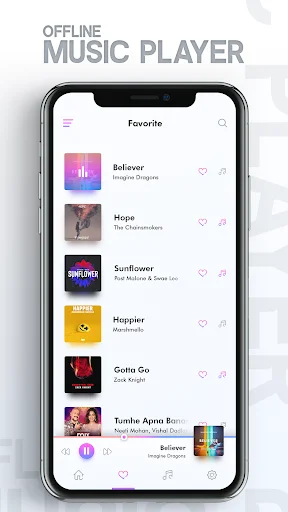
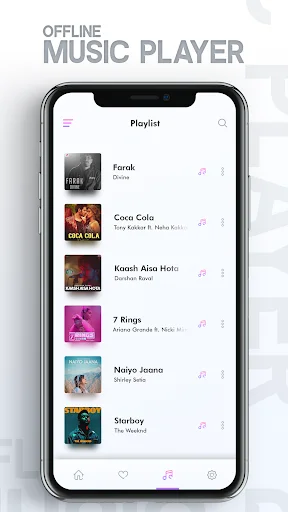
Browse your collection by song, album, artist, or folder. Create custom playlists for every mood, mark your favorite tracks, and use the smart search to find exactly what you want to hear in seconds.
Smart Listening Tools
Set a sleep timer to stop playback automatically, use shake gestures to control tracks hands-free, and trim songs with the built-in MP3 editor. Thoughtful features designed for how you actually listen to music.
ABOUT
What is Offline Music Player?
Play music stored on your Android device, organize your library and adjust the sound with an equalizer, bass enhancement and 3D audio effects. Local playback lets you enjoy saved songs without an internet connection, while the app also offers online music discovery.
Who is Offline Music Player for?
It is for listeners who want to keep their own music organized for commuting, traveling or listening where a connection is unavailable. Browse by song, album, artist or folder, build a playlist for a particular mood, or set a timer when you want playback to stop later.
What does Offline Music Player do?
- Play saved music and continue listening with the screen off.
- Browse songs, albums, artists and folders, search your library and sort songs or albums in different ways.
- Create playlists and mark favorite tracks so you can return to them.
- Adjust the equalizer, bass enhancement and 3D effects to change how your music sounds.
- Use the MP3 editing tools to trim tracks.
- Control playback with shake actions for play, next track or previous track.
- Set a sleep timer to stop playback after the time you choose.
- Change color themes to personalize the player.
- Explore the online music-discovery feature when connected.
How does Offline Music Player work?
Allow access to the audio files you want to play when prompted. Browse your device's music by song, album, artist or folder, then select a track to open the player.
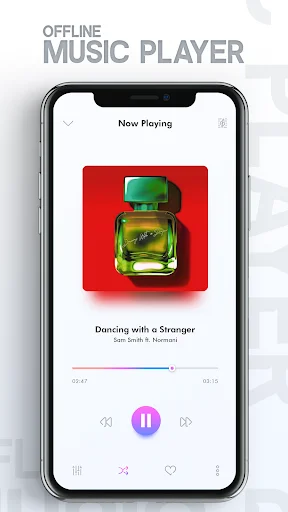
Use the playback controls to pause, resume or move between tracks. Add music to a playlist or mark it as a favorite, adjust the sound settings, and choose a theme or sleep timer to suit your listening session. Use the MP3 editor when you want to trim a saved track.
Compatibility and requirements
Offline listening requires music files already available on your device. Online music discovery needs an internet connection; it does not make every online song available for offline playback.
Playback and editing depend on supported audio files. Sound effects vary with your device and audio output, so keep the volume at a comfortable level. Screen-off playback may be affected by Android background and battery settings.
The app contains ads and offers in-app purchases.
Offline Music Player brings local listening, playlists and sound controls together so you can organize your songs and choose how to enjoy them.
See the Player in Action
Join Over a Million Happy Listeners
It's so so so so goo oooood There is is a place where we can choose how we want to hear the music. It could be live,bass ,party,rock,etc.i just downloaded blackpink dududu and hearing it live wa😱😱😱😱😱 .it feels as if I was there. I would really recommend this app . Thank God I found this app😃😃😃😃😊but the only issue is that I cannot pause the music if I didn't go to the app but still.. it's really good
It's so so so so goo oooood There is is a place where we can choose how we want to hear the music. It could be live,bass ,party,rock,etc.i just downloaded blackpink dududu and hearing it live wa😱😱😱😱😱 .it feels as if I was there. I would really recommend this app . Thank God I found this app😃😃😃😃😊but the only issue is that I cannot pause the music if I didn't go to the app but still.. it's really good
I'm happier than HELL with this app!! You don't have to "pay for premium". I've been looking for an app to play the songs on my phone, as I can't sleep without music. AND it reminds me of GPM a bit with the being able to make playlists, favoriting songs, and the general simple layout. It may not be what is advertised but I like it nicely done, developer!👍 😁👍
I'm happier than HELL with this app!! You don't have to "pay for premium". I've been looking for an app to play the songs on my phone, as I can't sleep without music. AND it reminds me of GPM a bit with the being able to make playlists, favoriting songs, and the general simple layout. It may not be what is advertised but I like it nicely done, developer!👍 😁👍
I started listening and it's nothing like ever before.Other than Spotify it does not need any internet to work with is more nice and sweet.When I go anywhere I can just listen to any music I like and want which is perfect and nice for me cause I'm a busy person.
I started listening and it's nothing like ever before.Other than Spotify it does not need any internet to work with is more nice and sweet.When I go anywhere I can just listen to any music I like and want which is perfect and nice for me cause I'm a busy person.
Loved it... This was the app I was looking for ages.. I love music.. But most of the apps won't work when I'm offline.. But this one have fulfilled my wish.. Thanks a lot.. Good job..
Loved it... This was the app I was looking for ages.. I love music.. But most of the apps won't work when I'm offline.. But this one have fulfilled my wish.. Thanks a lot.. Good job..
One of the best music players because it doesnt need wifi,it also can play and download any song to it, and ive used this non-stop.Would Definitely Recommend downloading this app
One of the best music players because it doesnt need wifi,it also can play and download any song to it, and ive used this non-stop.Would Definitely Recommend downloading this app
i finally find this app where i can listen music offline, no premium, free music, i can listen music in car now from when YT music was added☺️❤️
i finally find this app where i can listen music offline, no premium, free music, i can listen music in car now from when YT music was added☺️❤️
Start Listening Offline Today – Download Now
Join millions of satisfied users worldwide!